Grocery Food Facts Userscripts
Install
Grocery Food Factsv1.4.0
Show Open Food Facts scores, allergens, additives, and nutrition on Walmart and H-E-B product pages, compare Walmart products per 100 g, and flag listings that contradict their ingredients
Userscripts run in a userscript manager such as Tampermonkey, Violentmonkey, or ScriptCat. With one installed, Install opens its install prompt.
Shows Open Food Facts scores, allergens, additives, and nutrition on Walmart and H-E-B product pages, and compares Walmart products side by side per 100 g.
What it does
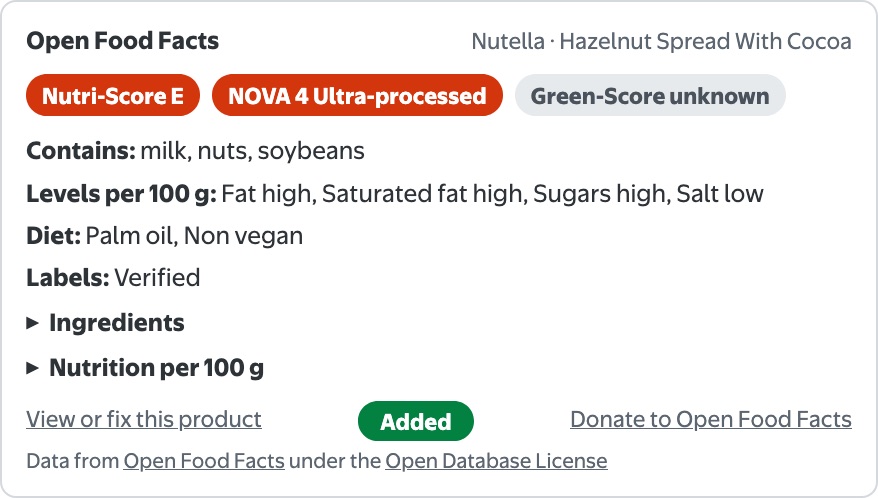
- adds an Open Food Facts panel to product pages, under the title on Walmart and under the price on H-E-B
- shows Nutri-Score, NOVA, and Green-Score as color-coded pills
- lists allergens, possible traces, additives, nutrient levels, diet flags, and labels
- expands to the full ingredients and a nutrition table per 100 g
- keeps up as you move between products without a full page load
- links to the product on Open Food Facts so you can view or fix it, and to their donation page
- shows the ingredients and allergen text from the Walmart listing when Open Food Facts has no entry, or fills them in when its entry has none
- warns when a Walmart listing contradicts its own ingredients, for example saying "No high-fructose corn syrup" while listing it
- offers an add-product link when a barcode has no entry yet
- offers a search by name when a listing has no global barcode, which is common for produce, deli, and meat
- sends only the barcode of the product you are viewing to Open Food Facts
Compare products
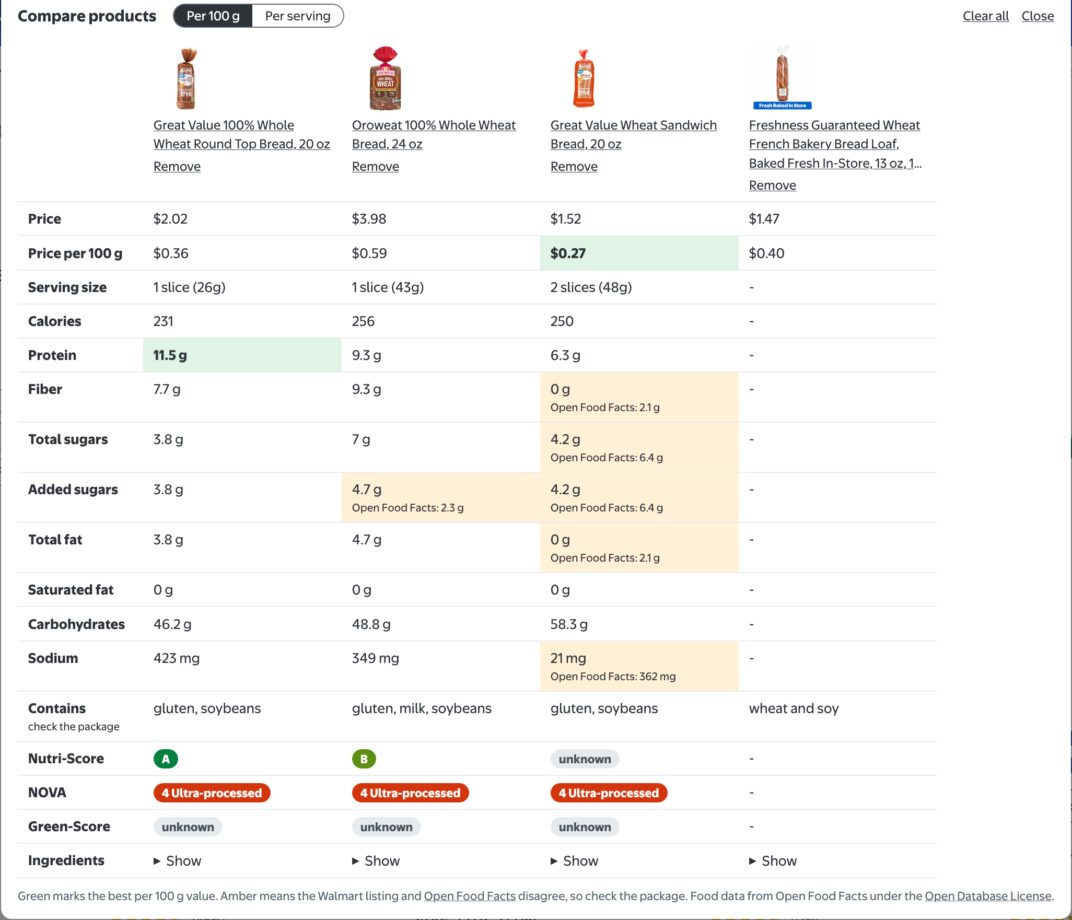
- adds a Compare button to Walmart product cards on hover, and to the panel on product pages
- keeps your picks in a Compare tray as you browse, across tabs, up to 6 products
- lines them up with price, price per 100 g, serving size, nutrition, allergens, scores, and ingredients
- switches between per 100 g, which makes different serving sizes fair, and the printed per-serving values
- marks the best per 100 g value in green for price, protein, fiber, sugars, saturated fat, and sodium
- uses the Walmart listing first and fills gaps from Open Food Facts
- shows both numbers in amber when the two sources disagree, and names no winner on that row
- makes one Walmart page request and one Open Food Facts lookup per product you add, and nothing until you click
Limitations
- the data is crowd-sourced and can be missing, out of date, or wrong, so check the package itself, especially for allergens
- nutrition is per 100 g, not per serving
- runs on www.walmart.com and www.heb.com only, and comparing, listing ingredients, and the claim check work on Walmart only
- the claim check covers plain "no x" and "x-free" wording for corn syrup, palm oil, artificial flavors, colors, and sweeteners, hydrogenated oils, and MSG, so no warning does not prove a claim is true
- listings with no nutrition data, common for store bakery items, only show price, allergens, and ingredients in the comparison
- prices in the comparison are from when you added the product
- drinks are compared per 100 ml under the same per 100 g labels
- needs a userscript manager with
GM_xmlhttpRequest, and it may ask you to allow connections to world.openfoodfacts.org - Open Food Facts limits lookups to 15 a minute per IP address, so very fast browsing may show a lookup error
Storage
vm-off-compare-v1in localStorage holds your comparison list
Data
Contains data from Open Food Facts, available under the Open Database License.
Questions or feedback about Grocery Food Facts Userscripts? Get in touch.
Support
Find Grocery Food Facts Userscripts useful?
Grocery Food Facts Userscripts has no paywall. A tip helps keep it running and pays for what we build next.
Checkout opens on Stripe, where you can change the amount. Why tips?
Related products
This userscript adds a review search panel to Hostelworld property pages so review text is easier to search and compare.
1 userscript
Adds a saved-searches panel to Kiwi.com so you can save, name, reload, and copy links to one-way flight searches. Searches stay in your browser.
1 userscript
Opens Linear workspace links in the Linear desktop app instead of the browser, skipping marketing, docs, and login pages, with a per-page opt-out.
1 userscript